
Screenshots
Giới thiệu về iCenter OS16 - Control Center
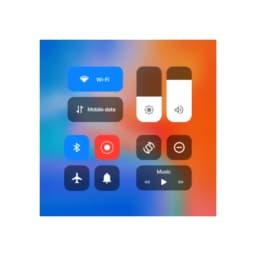
iCenter OS16 - Control Center brings the intuitive design of iOS 16 to your Android device, giving you streamlined access to the controls and settings you use most. Manage your phone with a modern interface that puts everything within a swipe or tap.
Quick access to essential controls
Pull down notifications from the top-left or open the control center from the top-right to instantly reach your most-used tools. Music playback, camera, flashlight, calculator, screen rotation, Wi-Fi, mobile data, brightness, and Bluetooth are all available from a single screen. The notification center works similarly to iOS 16, letting you respond to alerts without leaving your current app. Volume and brightness adjustments respond to swipe gestures, making fine-tuning effortless.
Streamline your workflow with smart toggles
Enable or disable Wi-Fi, mobile data, Bluetooth, and screen orientation lock with a single tap. A dedicated Do Not Disturb mode silences calls and notifications when you need focus time. One-tap shortcuts give you instant access to your camera, alarm, timer, and voice recorder—no need to hunt through your app drawer. The control center remembers your music player state, so playback controls are always ready when you need them.
Customize the look and feel
The control center adapts to your preferences with adjustable background styles and notification appearance options. Add shortcuts to any app on your phone, turning the control center into a personalized hub for your daily tasks. This combination of functionality and aesthetics means the control center stays useful without feeling cluttered.
Smooth navigation with gesture support
Swiping becomes your primary way to navigate—pull down from the top-left for notifications, or access the control center from the top-right. These intuitive gestures reduce the steps needed to reach important functions, speeding up common actions like adjusting volume or toggling Bluetooth.
Embrace modern device control with iCenter OS16 - Control Center, designed to give Android users the streamlined experience of iOS 16's interface. Requires Android 5.0 or higher.
Ưu điểm & Nhược điểm
Ưu điểm
- iOS-style control center brings familiar interface to Android
- Quick toggles for Wi-Fi, Bluetooth, Do Not Disturb, and more
- Customizable shortcuts let you add any app to the control center
- Gesture-based navigation reduces steps to access common functions
Nhược điểm
- Adds a persistent system-level overlay that may impact battery life
- Requires permission to intercept notifications and system controls
- Customization options may be confusing for users unfamiliar with iOS
- Could conflict with your device's native control center or launcher
Ứng dụng liên quan

HWiNFO
Hardware monitoring for Windows—track CPU temp, GPU load, fan speed, voltage in real time.

TransMac
Read Mac drives and DMG files on Windows. Access APFS/HFS+ storage and create disk images.

Advanced SystemCare Free
System optimization tool: clean, repair, and secure your PC. Remove malware, fix errors, and boost performance.

Display Driver Uninstaller (DDU)
Driver uninstaller for GPU and audio — removes residual files for clean Windows updates

Glary Utilities
PC maintenance and optimization suite — clean, repair, and speed up your Windows computer in one action.

Universal ADB Drivers
ADB drivers for Android: Connect any smartphone to Windows PC without manufacturer software.
Latest Articles

Best DealSeek alternatives in 2026 (we compared 7)
Jun 10, 2026

Best Discovery Plus alternatives in 2026 (we compared 7)
Jun 10, 2026
Discovery Plus vs iHeartRadio in 2026: video shows vs free radio, head to head
Jun 10, 2026

iHeartRadio vs SoundCloud in 2026: free radio app vs music discovery, compared
Jun 10, 2026

Is HappyMod legal in 2026? Copyright, country snapshots, and verified alternatives
Jun 10, 2026